

The Invoice Reconciliation Agent: How AI Closes the Gap Between What Was Ordered and What Was Billed
byAtypical Tech · Published on 09 Aug 2026
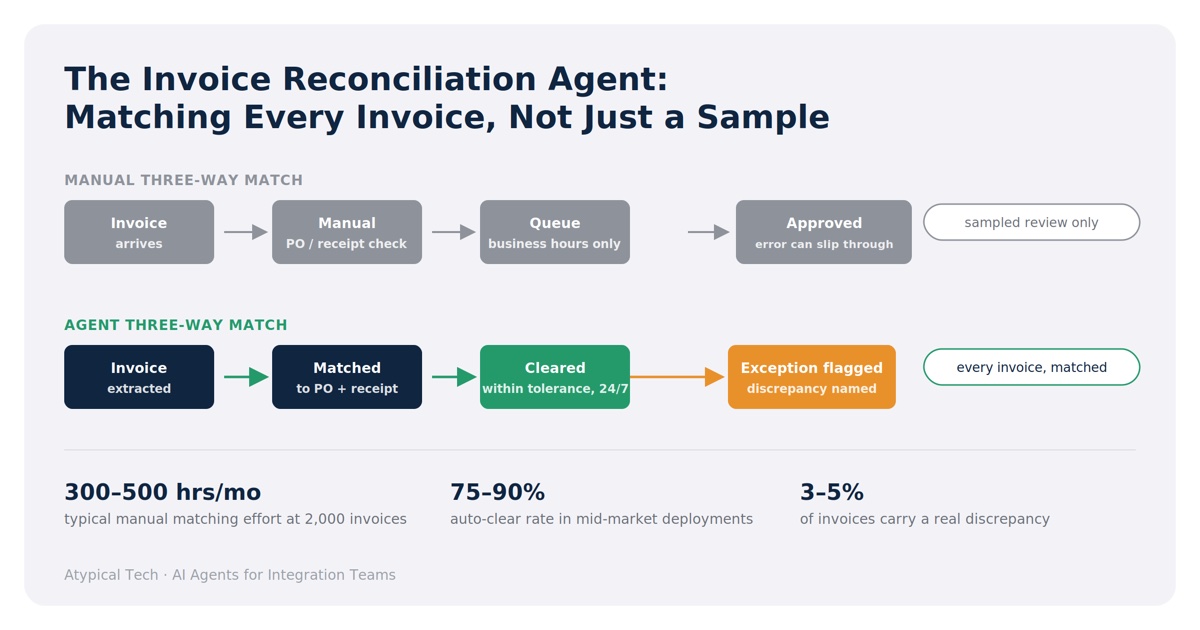
A mid-market AP team processing 2,000 invoices a month spends, on average, 300–500 hours matching them against purchase orders and goods-receipt records by hand. Roughly 3–5% of invoices carry a discrepancy — wrong price, wrong quantity, a duplicate submission — and catching those before payment is the entire job. Miss one, and the cost is not the invoice line; it is the write-off, the vendor dispute, or the quiet erosion of margin nobody notices until period-end.
This is a matching problem, not a judgment problem, which is exactly the kind of task an AI agent handles well: read three documents, apply a rule set, escalate what doesn't fit. Below is how the pattern works, what it takes to build, and where it genuinely saves an AP team time versus where it just moves the bottleneck.
Why this matters
Three-way matching — invoice, purchase order, goods receipt — is the standard control in every finance textbook and the first one that erodes under real volume. Reviewers cross-check line items across three systems that were never designed to talk to each other, under month-end and quarter-end pressure, using judgment that lives in a spreadsheet or in one person's head. The failure mode isn't dramatic. It's a few percent of invoices approved a little too fast, a duplicate that slips through because the vendor changed their invoice number format, a price variance nobody had time to chase.
An agent doesn't remove the control. It runs it on every invoice, at the same standard, at whatever hour the invoice lands — and it hands the AP team a shorter, better-qualified list of exceptions instead of a full queue.
What the agent does
| Step | Action |
|---|---|
| 1. Capture | Watches for new supplier invoices landing via email, portal upload, or document management system |
| 2. Extract | Reads the invoice (including scanned/PDF formats) and extracts line items, quantities, prices, PO reference, and vendor details |
| 3. Match | Retrieves the corresponding purchase order and goods-receipt record from the ERP and compares line by line |
| 4. Evaluate | Checks price variance, quantity variance, duplicate invoice numbers, and missing or mismatched PO references against configurable tolerance thresholds |
| 5. Clear or escalate | Auto-approves invoices within tolerance for payment processing; routes exceptions to the AP team with the specific discrepancy flagged, not just "review this" |
Everything within tolerance moves straight to payment approval. Everything outside it lands in front of a person with the mismatch already identified — a price variance of €340 on line 3, a quantity that doesn't match the receipt, an invoice number that's been seen before.
Strengths and honest limits
Where it earns its keep
- Runs the full match on every invoice, not a sampled subset — coverage that manual review at volume rarely achieves
- Catches duplicate invoices reliably, including near-duplicates with a changed date or reference number, which is a common leakage point
- Removes the queue backlog at month-end and quarter-end, when invoice volume spikes and manual capacity doesn't
- Gives reviewers a qualified exception with the discrepancy already named, instead of a raw invoice to re-derive from scratch
Where it doesn't
- It matches against the data it's given. If PO line items are sloppy or goods receipts are entered late, the agent will flag false discrepancies — and the fix is upstream data discipline, not a smarter agent
- Judgment calls — a vendor's known pricing exception, a negotiated one-off — need a rule written down somewhere, or a human decides them every time
- Line-item extraction accuracy on poor-quality scans is a real variable; expect a tuning period on document quality before auto-clear rates are trustworthy
- It will not resolve a vendor dispute. It tells you a dispute exists faster than a person would have found it
Coverage: where this pattern fits
The matching logic is portable across the systems finance teams actually run. The two variables are how invoices arrive and how the PO/receipt data is structured in the ERP.
Invoice capture
| Source | Notes |
|---|---|
| Vendor portal upload | Cleanest structured data; least extraction risk |
| Email inbox (PDF attachment) | Most common intake method in mid-market; extraction quality depends on invoice layout consistency per vendor |
| Scanned paper invoice | Highest extraction risk; expect a longer tuning period and a lower initial auto-clear rate |
| EDI / structured feed | Rare below enterprise scale, but where present it removes extraction risk entirely |
ERP-side matching
The agent needs reliable PO and goods-receipt records to match against — this works across the major mid-market ERPs (NetSuite, SAP, Microsoft Dynamics 365, Oracle Fusion, Sage Intacct, and similar platforms), with the caveat that match accuracy is only ever as good as how consistently POs and receipts are entered in the first place. Where Atypical Tech has partnered on this pattern, the agent has run on an integration platform we partner with, connecting the invoice capture layer to the ERP's PO and receipt data without custom point-to-point code.
Decision framework — five questions in order
Run these against your actual AP process. Stop at the first match.
- Do you have three-way matching documented as a rule set today, even informally? If the tolerance thresholds and escalation rules live in one controller's head, write them down first. The agent automates a specification — it can't infer one from how someone currently uses their judgment.
- Is your invoice volume above roughly 500 invoices per month, or does the queue back up at period-end? Below that with no period-end spike, the return is smaller than the tuning effort. This pattern pays off on volume and on peaks, not on steady low throughput.
- Are your POs and goods receipts entered consistently in the ERP before invoices arrive? If receipts are routinely late or PO line items are inconsistent, fix that first — an agent matching against bad reference data just produces false exceptions and erodes trust in the tool.
- How clean is your invoice intake? Vendor-portal or EDI invoices are close to plug-and-play. A mailbox full of inconsistent PDF layouts from hundreds of vendors is workable, but budget real tuning time before trusting the auto-clear rate.
- Who owns acting on the exception data? The agent will surface, within weeks, exactly which vendors or categories generate the most discrepancies. If no one owns that pattern, you've automated the check but not the improvement — still worthwhile, but a smaller share of the available return.
What it costs and what it returns
Indicative ranges from mid-market deployments. Every figure moves with invoice volume, document quality, and how much ERP integration already exists — get a scoped estimate rather than budgeting from this table.
| Volume | Manual matching effort today | Typical auto-clear rate | Residual human review | Where the return comes from |
|---|---|---|---|---|
| ~500 invoices/mo | 0.3–0.5 FTE | 75–85% | 75–125 reviews/mo | Time back more than headcount change |
| ~2,000 invoices/mo | 1.5–2.5 FTE | 80–88% | 240–400 reviews/mo | Period-end capacity stops being a staffing crunch |
| ~8,000 invoices/mo | 5–8 FTE, plus routine overtime | 82–90% | 800–1,440 reviews/mo | Headcount reallocation to exception handling and vendor management |
As with any matching agent, the auto-clear rate reflects the quality of your reference data, not the agent's ceiling. Teams starting from inconsistent PO/receipt entry typically see 55–65% in month one; the number climbs as the exception data drives upstream fixes to how POs and receipts get entered.
FAQ
Does this replace the AP team? No. It replaces the part of the job that is pure matching, and returns the team's time to the part that needs judgment — vendor disputes, exception patterns, process fixes.
What happens if the agent gets a match wrong? It shouldn't auto-approve anything outside a configured tolerance. Set tolerances conservatively at launch and widen them as trust in the match quality builds.
Can it handle multiple currencies or subsidiaries? Yes, provided the ERP's PO and receipt data is structured with that information — the agent inherits whatever structure already exists there.
How long does it take to see a stable auto-clear rate? Typically 4–8 weeks, depending on invoice source mix and how consistently PO/receipt data is entered. Scanned-invoice-heavy intake takes longer to stabilize than portal or EDI intake.
Does it work alongside our existing approval workflow? Yes — it sits ahead of approval, clearing what's within tolerance and routing exceptions into the same approval path exceptions already follow today.
Closing — Next steps
Three-way matching is a control every finance team already runs; the question is whether it runs on every invoice or on whatever a stretched team has time for this month. An agent doesn't change the control — it changes the coverage, and it gives the AP team back the hours currently spent on the invoices that were always going to clear anyway.
Atypical Tech builds this pattern on an integration platform we partner with, across the ERP and invoice-intake combinations above. If you want to work through your tolerance rules and current match rate against your own stack, get in touch.
About the author
Bruno Galo — Founder, Atypical Tech
Bruno Galo is the founder of Atypical Tech, a NetSuite consultancy serving mid-market clients across Iberia. He specializes in connecting CRM and ERP systems for seamless order-to-cash workflows, building automated order management pipelines that eliminate manual data entry between sales and finance teams. As an official Stacksync implementation partner, Bruno designs and deploys AI agents on integration platforms to handle exception routing, document processing, and reconciliation — turning fragmented order flows into reliable, self-monitoring systems.
Sources
ERP purchase order and goods-receipt matching
- Oracle NetSuite — 3 Way Match Vendor Bill Approval Workflow and Billing a Purchase Order With Advanced Receiving
- SAP — Logistics Invoice Verification and Tolerance Limits for Invoice Postings
- Microsoft Dynamics 365 Finance — Accounts payable invoice matching overview and Three-way matching policies
- Oracle Fusion Cloud Payables — Matching Invoice Lines and Match Approval Level Options
- Sage Intacct — Match tolerances overview
Benchmarks
- Ardent Partners — AP Metrics that Matter in 2025, for exception rates and touchless processing rates
- AIMultiple — Invoice OCR Benchmark: Extraction Accuracy of LLMs vs OCRs, for the extraction-accuracy gap between scanned and structured intake
The effort and auto-clear figures in the tables above come from Atypical Tech deployments and are not drawn from the published benchmarks; they describe match clearance within tolerance, which is a narrower measure than end-to-end touchless processing.
Comments
No comments yet.
Leave a comment
Your comment will be reviewed before publishing.
Controller: Atypical Tech S.L. Purpose: to answer your enquiry. Legal basis: your consent. Rights: access, rectification, erasure and the others described in the policy, by writing to hello@atypicaltech.com.