

ERP data migration: what to clean, archive and leave behind
byBruno Galo · Published on 11 Jan 2026
Last updated 12 Aug 2026
Ask to see an ERP implementation plan and data migration will appear as a phase — usually a few weeks, sandwiched between configuration and testing, sized as though moving data were a mechanical export-and-import exercise. It is not. Migration is where every assumption made during design meets the actual, uncurated history of how the business has really operated, and it is disproportionately often the reason implementations slip, for reasons already discussed in this series' article on NetSuite implementation failure patterns.
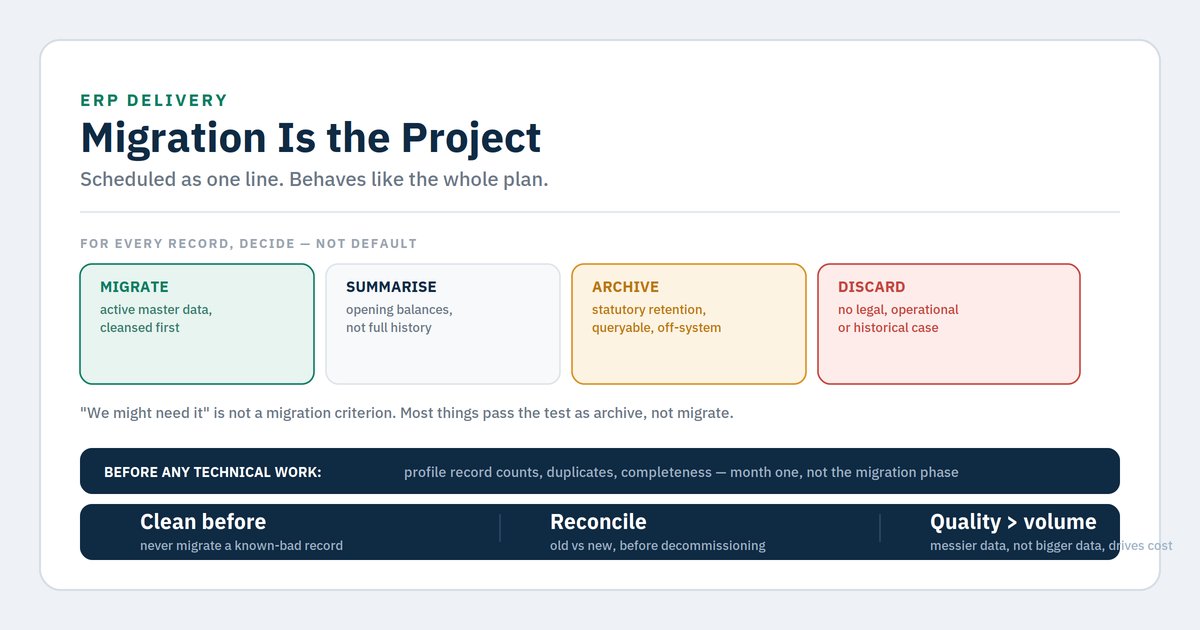
The plan treats migration as a technical task: extract, transform, load. The reality is that migration is a decision-making exercise disguised as a technical task — what to bring forward, what to clean first, what to archive rather than migrate, and what to leave behind entirely — and every one of those decisions has consequences for cost, timeline and how usable the new system actually is on day one.
Why this matters
Underestimating migration has a specific and repeatable failure signature. Profiling is skipped or rushed, the true state of the data is discovered during the migration phase itself rather than before it, and the discovery forces a renegotiation of scope and timeline at the point in the project with the least slack remaining — because go-live has usually already been communicated to the business and cannot easily move.
The cost of getting this wrong compounds after go-live too. Data migrated without proper cleansing carries its problems into the new system, except now they are harder to fix, because they are embedded in a system everyone has started relying on and are mixed with genuinely new transactions. A duplicate customer record that existed in the old system for years is an annoyance; the same duplicate, freshly migrated into a system everyone now trusts as the source of truth, actively misleads decisions.
There is also a scope question migration forces that nothing else in the project forces as directly: not everything in your current system deserves to exist in the new one. Old inactive customers, discontinued items, historical transactions beyond what is legally required — migrating all of it by default, because nobody explicitly decided otherwise, inflates cost, slows performance and pollutes the new system with irrelevance from day one.
At a glance: the migration decision categories
| Category | Definition | Typical treatment |
|---|---|---|
| Migrate as master data | Active, current, needed for ongoing operations | Cleansed, validated, migrated with full history where required |
| Migrate as opening balances only | Financial position needed, but transaction-level detail is not | Summarised into opening balances, not migrated transaction by transaction |
| Archive, accessible but not in the new system | Required for legal retention or occasional lookup, not for daily operation | Extracted and stored outside the ERP, in a queryable but separate archive |
| Leave behind entirely | No legal, operational or historical justification for retention | Not migrated, not archived — genuinely discarded |
| Clean before migrating | Needed, but currently duplicated, malformed or incomplete | Remediated first; never migrate a known-bad record and plan to fix it later |
The category most often collapsed into "migrate everything" by default is the second and third. Full transactional history is expensive to migrate and rarely needed at that granularity — an opening balance, correctly struck, usually serves the business better than years of granular history nobody will query, and statutory retention requirements are usually satisfied by an accessible archive rather than by live presence in the new ERP.
What works, and what to be honest about
What works:
Profiling before scoping, not during migration. Establish record counts, duplicate rates, completeness of mandatory fields, and referential integrity in the first month of the project, not the migration phase. This is the single highest-leverage step in the entire migration and it is the one most often skipped under time pressure, exactly because it feels like it can wait.
Deciding retention by category, deliberately, with input from finance and legal. Iberian statutory retention requirements differ by document and record type, and "how long do we need to keep this" is a compliance question, not an IT question. Get the answer for each category before deciding what to migrate versus archive.
Cleansing before migrating, never after. A known duplicate or malformed record should be fixed before it moves, not migrated with a plan to clean it up once live. Once live, it is mixed with genuine new activity and considerably harder to isolate and correct.
Migrating opening balances rather than full transaction history wherever the business does not need transaction-level lookup. This is consistently underused because it feels like it loses something, but for most mid-market companies the historical transaction detail is rarely queried after the first few months, and a correctly struck opening balance preserves everything the business actually needs.
A defined, tested rollback and reconciliation step. Every migration needs a way to prove the new system's data matches the old, category by category, before the old system is decommissioned. Skipping this is how companies discover a migration error months later, once the comparison is no longer straightforward.
What to be honest about:
Profiling will find things nobody wants to hear about. Duplicate rates and data quality issues discovered during profiling are frequently higher than anyone expects, and the temptation is to treat the finding as an exaggeration rather than a fact. Budget the time this remediation will take honestly, because discovering the true scope late is worse than discovering it early and disliking the number.
"We might need it" is not a migration criterion. Nearly everything might conceivably be needed someday. The discipline is asking what specifically would be needed, by whom, under what circumstance, and whether an archive rather than live migration satisfies that need. Most things pass this test as "archive," not as "migrate."
Cleansing takes longer than the plan allows, almost every time. This is not a criticism of any particular team — it is a structural feature of the work, because cleansing surfaces judgement calls (is this a duplicate, or two genuinely different entities with the same name?) that cannot be fully automated and that multiply with data volume.
Migrated history has to actually reconcile, and reconciliation is its own significant task. Comparing balances, counts and samples between old and new systems, category by category, is real work that needs to be planned and resourced, not assumed to happen automatically as a side effect of the migration scripts running successfully.
The business will ask for things back after go-live. Some archived or excluded data will turn out to be wanted after all, usually for a specific customer dispute or an unusual audit request. This is manageable if the archive is genuinely accessible, and a crisis if "archived" turned out to mean "deleted."
Decision framework: scoping and running the migration
Run in order. Stop at the first match.
1. Has the data been profiled — record counts, duplicate rates, completeness, referential integrity — independently of the migration timeline?
If not, do this now, in the first month of the project regardless of what phase the plan says migration belongs in. This finding reprices everything that follows and it is far cheaper to have early.
2. Has each data category been explicitly assigned to migrate, summarise, archive or discard — with finance and legal input on retention?
If not, do this before any technical migration work begins. Defaulting to "migrate everything" is a decision by omission, and it is usually the wrong one.
3. Are known data quality issues being cleaned before migration, or deferred to "fix later"?
If deferred, stop and reconsider. Migrating known-bad data with a plan to fix it afterward reliably fails, because the fix becomes harder once mixed with live activity and less urgent once the immediate pressure of go-live has passed.
4. Is there a defined reconciliation process comparing old and new system data before the old system is decommissioned?
If not, build one now. This is not optional insurance — it is the only mechanism that catches migration errors while they are still cheap to fix.
5. Have retention decisions been documented with a named accountable owner, particularly for anything not being migrated?
If not, document this before go-live. "We decided not to migrate X" needs to be traceable to a decision and a reason, not reconstructed months later when someone asks where something went.
6. All of the above complete — is the migration timeline still realistic?
Revisit the estimate honestly in light of what profiling found. A migration timeline set before profiling was a guess; one set after is an estimate, and the two are rarely the same number.
7. Migrated and live — has reconciliation actually been completed and signed off?
Do not decommission the old system until this is done and documented. The old system is your only reference point for catching a migration error, and once it is gone, that reference point is gone with it.
Indicative cost and effort
| Workstream | Typical elapsed time | Effort profile |
|---|---|---|
| Data profiling | 2–4 weeks | Light effort, high value |
| Category assignment with finance and legal input | 1–2 weeks | Light — decisions |
| Cleansing and remediation | 4–16 weeks | Heavy — scales with what profiling finds |
| Archive extraction and setup | 2–5 weeks | Medium |
| Migration build and execution | 4–8 weeks | Medium to heavy |
| Reconciliation process design and execution | 2–4 weeks | Medium |
| Post-go-live data support | 4–8 weeks | Light, reactive |
Migration effort scales far more with data quality than with data volume — a smaller, messier dataset can easily cost more to migrate well than a larger, cleaner one. Get a quote for a scoped profiling and estimate.
Frequently asked questions
How much historical data do we actually need to migrate?
Less than most companies assume. Statutory retention requirements set a floor, but that floor is usually satisfied by an accessible archive rather than live presence in the new ERP, and most operational queries do not reach back more than a year or two. Establish the genuine operational need separately from the legal retention need — they usually point to different answers.
What is the biggest single cause of migration overrun?
Skipping or rushing profiling. Almost every migration overrun we have inherited from another partner traces back to data quality being discovered during the migration phase rather than before it, at which point it becomes a timeline and budget renegotiation rather than a planning input.
Should we clean the old system, or clean during migration?
Clean before, wherever possible. Cleansing in the old system is usually easier, because the team understands that system's quirks and history, and it means the new system starts genuinely clean rather than inheriting a promise to clean up later that competes with every other post-go-live priority.
How long should we keep the old system accessible after go-live?
Long enough to complete reconciliation with confidence and to handle the initial wave of "we need something we didn't migrate" requests — in our experience, a minimum of several months, and longer for finance data given statutory audit and reporting cycles. Decommissioning too early to save licence cost is a common and regrettable false economy.
Does this apply the same way to a CRM or ecommerce platform migration, not just ERP?
The principles are identical — profile first, decide categories deliberately, clean before moving, reconcile before decommissioning — though the specific data types and retention rules differ. The discipline transfers regardless of which system is being migrated.
Closing — Next steps
Data migration fails as a plan line item because it is not actually a technical task with a predictable duration — it is a series of judgement calls about what your business's history actually needs to become, made under the specific pressure of an approaching go-live date. Treating it as an execution phase rather than a decision-making project is the single most common reason it goes over.
The corrective is available at almost any stage: profile the data honestly, however uncomfortable the finding, and make the migrate-versus-archive-versus-discard decision deliberately for each category rather than by default. Projects that do this in month one instead of month four are the ones that do not renegotiate their timeline at the worst possible moment.
About the author
Bruno Galo is the founder of Atypical Tech, a NetSuite consultancy serving mid-market clients across Iberia. He specializes in connecting CRM and ERP systems for seamless order-to-cash workflows, building automated order management pipelines that eliminate manual data entry between sales and finance teams. As an official Stacksync implementation partner, Bruno designs and deploys AI agents on integration platforms to handle exception routing, document processing, and reconciliation — turning fragmented order flows into reliable, self-monitoring systems.
LinkedIn: https://www.linkedin.com/in/brunogd
Sources
URLs are publisher-level and should be verified before publication.
- Oracle NetSuite, data migration and CSV import documentation — https://docs.oracle.com/en/cloud/saas/netsuite/
- Agencia Tributaria (Spain), record retention requirements — https://sede.agenciatributaria.gob.es
- Autoridade Tributária e Aduaneira (Portugal), record retention requirements — https://info.portaldasfinancas.gov.pt
- DAMA International, Data Management Body of Knowledge (DMBOK) — data quality dimensions — https://www.dama.org
- Atypical Tech engagement experience, mid-market ERP migrations across Iberia
Comments
No comments yet.
Leave a comment
Your comment will be reviewed before publishing.
Controller: Atypical Tech S.L. Purpose: to answer your enquiry. Legal basis: your consent. Rights: access, rectification, erasure and the others described in the policy, by writing to hello@atypicaltech.com.